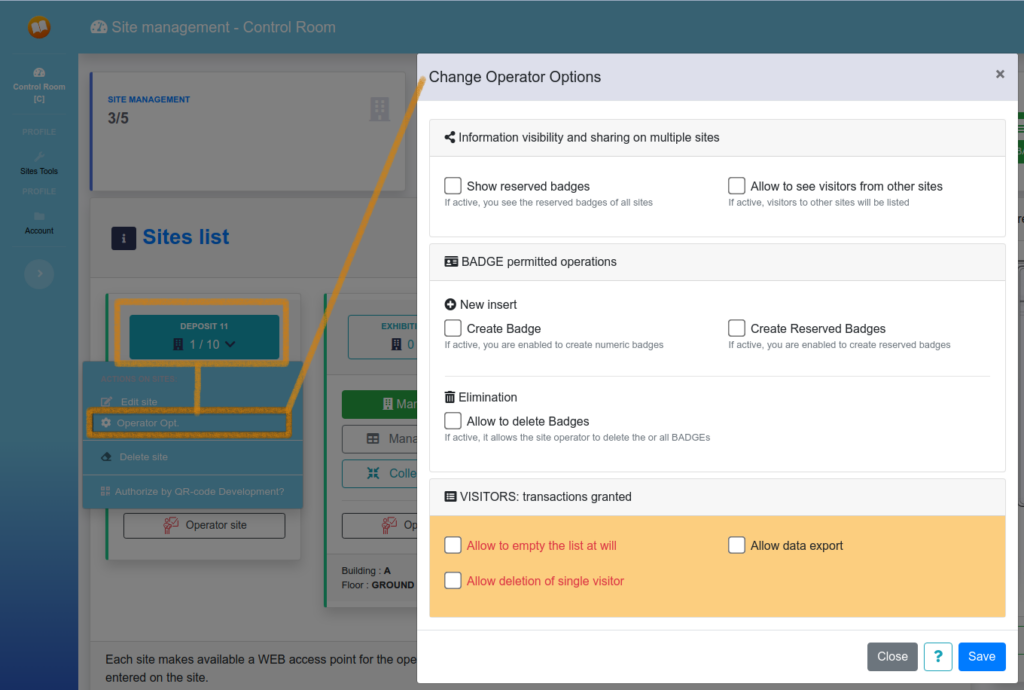
Access to site options
Each site has options that can be customized by the manager, in order to guarantee more accessibility and maintenance.
Information visibility and sharing on multiple sites
Allows the site operator to see the BADGES of other sites, in the event that a registered operator can access multiple sites with the same Badge.
Show reserved badges
A receptionist can be enabled or disabled to operate reserved badges. This ability is enabled by default because, in the cases currently being handled, certain suppliers are more frequent and their significant activity within the site is therefore recognized.
Allow to see visitors from other Reception
In some contexts, a receptionist needs to be able to see the status of other receptionists without being a system administrator. This view becomes operational for all visitor activity in reports and operations.
BADGE permitted operations
Operazioni permesse ad operatrori di reception sui BADGE
BADGE permitted operations
Create Badge
Allows the creation of new badges, as the available ones are insufficient. This operation is primarily permitted to system administrators who determine the sufficient quantities for the site and security rules.
Create Reserved Badges
Allows the creation of new badges reserver, as the available ones are insufficient. This operation is primarily permitted to system administrators who determine the sufficient quantities for the site and security rules.
Elimination
It allows the site operator to delete badges independently without having to depend on the administrator. ATTENTION this could cause a loss of information, which cannot be managed centrally!
VISITORS Transactions granted
This section enables operations on local visitors to the site.
It allows you to export and delete the visitor list
DELETE VISITORS: in the case of ADR or security or privacy management, enabling these items is dangerous, because the managers would no longer have visibility of the information attached to manage documents that enable the visitor to interact with the structure.
Allow to clear list at will
It allows you to delete the history of visitors who have registered on the site. As with all data loss practices, EasyBadge.net does not offer recovery services free of charge. Certain conditions, such as late recovery requests or problems, may not guarantee this operation.
Allow data export
Data exports pose a potential risk of unauthorized disclosure. If authorized, the receptionist must consider privacy concerns.
Allow deletion of single visitor
It allows you to delete data for one visitor at a time. This activity, being a data-lost operation, falls within the scope of information recovery without incurring additional costs.
Master CAPO Mode
This mode was designed for areas where there is no dedicated staff. A foreman knows who needs to come to work and who needs to be checked, not for inspection purposes, but for safety reasons. In this case, the time required for this activity is minimal.
Enabling this mode will change some small details in the operator interface.
Enable automatic closure, with an all out of hours
This setting allows you to specify what time the reception will have an all-clear. The manager will certainly have a look at the site before closing and will be able to ensure that no one is present, and EasyBadge.net should be a security support tool.
Enable change PIN every hours
In Master Manager mode, the generated PIN required for self-registration can be valid for one day or half a day. This ensures that the supplier is present on that day and is not false information.
With the value zero (0), no PIN, four (4) hours, twelve (12) hours, sixteen (16) hours, twenty-four (24) hours.
How to "Access to site options"
To access the options proceed from the Sites Dashboard panel..